Appearance
Fuzzy Fever
In real life, things aren't always black and white, especially in medicine. A body temperature of 38°C might be defined as “fever,” but what about 37.9°C? Is that definitely normal? Or almost a fever? This is where fuzzy logic comes in.
Why Use Fuzzy Classification?
Unlike traditional logic, which says something is either true or false, fuzzy logic lets values fall somewhere in between. It uses fuzzy sets, which assign a degree of membership between 0 and 1, allowing us to express how much something belongs into a category.
For example:
- 37.5°C → membership:
0(no fever) - 38.5°C → membership:
1(clear fever) - 37.75°C → membership:
0.5(partial fever)
This allows us to say: “The patient might be developing a fever” instead of forcing a yes or no. It’s a smarter, more flexible way to reason about uncertainty and it's especially useful in early detection, triage, or monitoring systems where small changes matter.
Truth Values
In Arden Syntax, these membership degrees are expressed using truth values. They are a special data type used for storing how true something is. You are probably familiar with Boolean values (just true or false), and Arden supports those too, in fact, truth value and Boolean are treated the same for backwards compatibility.
The key difference is that truth values in Arden Syntax aren’t just all or nothing but can be any real number between 0 and 1:
- 1 means completely true (
true) - 0 means completely false (
false) - Anything in between (like
0.5) means partially true, which is useful for expressing uncertainty or gradations in medical reasoning
Fuzzy Set Definition
The above examples can be expressed in Arden Syntax in the following manner:
Fever := fuzzy set (37.5, truth value 0), (38, truth value 1);
Here, we start to see non-zero degrees of membership starting at 37.5°C, and then gradually increasing until reaching full membership (truth value = 1) at 38°C, like in the visual representation below. 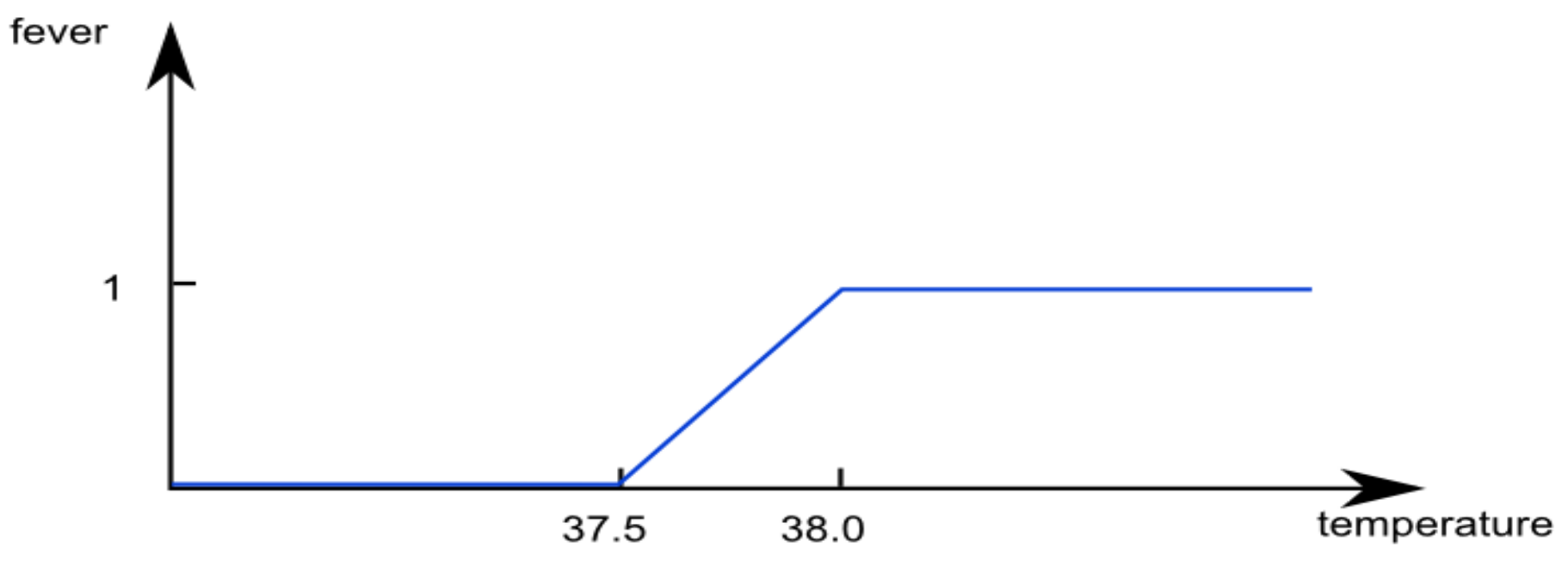
Fuzzy Fever MLM
arden-syntax
maintenance:
  title:          Fuzzy Fever Classification;;
  mlmname:        fuzzy_fever;;
  arden:          version 3;;
  version:        1.0;;
  institution:    Medexter Healthcare;;
  author:         Knowledge Engineering Team;;
  specialist:     Knowledge Engineering Team;;
  date:           2025-06-06;;
  validation:     production;;
library:
    purpose: Estimates fever intensity based on patient temperature;;
    explanation: A temperature of 37.75°C falls midway between “fever” and “no fever,” so its membership value is 0.5, which indicates partial presence of fever;;
    keywords: fever, fuzzy, temperature;;
    citations: ;;
    links: ;;
knowledge:
    type: data_driven;;
    data:
        temp := 37.75;
        // Fuzzy set definitions
        fever := fuzzy set (37.5, truth value 0), (38, truth value 1);
        ;;
    priority: 50;;
    evoke: ;;
    logic:
        if temp is in fever then
            msg := "Patient has fever";
        endif aggregate;
        conclude true;;
    action:
        return msg || " with" || applicability of msg;;
    urgency: 50;;
resources:
  default: en;;
  language: en;;
  end:
Using our example value of 37.75°C, this MLM returns "Patient has fever with truth value 0.5".
Aggregate Keyword
When an IF condition in Arden Syntax evaluates to a fuzzy truth value (anything between 0 and 1), the program splits, meaning both branches may execute in parallel. Once both branches have finished running, the program faces a decision: Should it stay split, or reunify into a single flow?
There are two options:
- Stay split (default): each branch continues running on its own, all the way through the action slot. If the MLM is part of a larger system, the calling module must be ready to handle multiple parallel results.
- Reunify with
AGGREGATEkeyword: the program merges back into a single flow. To do this, addAGGREGATEafterENDIFlike in the example.
To learn more about parallel execution head over to Control Flow
Pattern Matching
After returning an output message, we might want to analyze it further, for example, to extract specific values or make follow-up decisions based on its content. Arden Syntax supports pattern matching for this purpose. There are two wildcards you can use, _ matches any single character, % matches arbitrarily many characters.
arden-syntax
    logic:
        match := not text matches pattern "%0";
        conclude true;;
    action:
        return match;;
Let’s say we want to check if the patient’s fever truth value is exactly 0 (i.e., the patient has no fever at all). You can use the pattern %0 to match any string ending in 0. This works because:
%ignores any characters before the0- A value like
0.5won’t match, since it has characters after our required0
This allows you to confidently identify "no fever" cases, based on how the message ends. You can find out more about String Operations in the references.
What this section covered:
- Purpose of fuzzy logic
- Declaration of fuzzy sets
- Aggregation keyword
- String matching patterns